Description:
A service principal name (SPN) is a unique identifier of a service instance. SPNs are used by Kerberos authentication to associate a service instance with a service logon account. This allows a client application to request that the service authenticate an account even if the client does not have the account name.
Cause or Reason:
Before the Kerberos authentication service uses an SPN to authenticate a service, the SPN must be registered on the account object that the service instance uses to log on.
Resolution:
(1) To create /register an SPN for the FQDN of the SQL Server use the following command:
setspn -A MSSQLSvc/SQL_Server_FQDN:1433 Domain\Account
For example:
setspn -A MSSQLSvc/HOSTNAME.domain.com:1433 Domain\service-account
(2) To create /register SPN for web application (IIS, Sharepoint etc.) use the below commands:
setspn -S HTTP/webappurl.domain.com Domain\service-account
(3) To verify the SNP use the following command:
setspn –L domain\SQL Service Account
For example:
setspn –L Domain\service-account
(4) To delete /de-register SNP for the FQDN of the SQL Server use the following command:
setspn -D MSSQLSvc/SQL_Server_FQDN:1433 Domain\Account
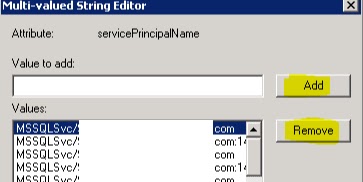
(5) Alternatively, these tasks can be performed through ADSIEDIT. Connect to default naming context, navigate through the service account, select attribute servicePrincipalName and click Edit. Be very careful as ADSIEDIT is low level editor and could impact the environment if not handled properly.
(4) To delete /de-register SNP for the FQDN of the SQL Server use the following command:
setspn -D MSSQLSvc/SQL_Server_FQDN
(5) Alternatively, these tasks can be performed through ADSIEDIT. Connect to default naming context, navigate through the service account, select attribute servicePrincipalName and click Edit. Be very careful as ADSIEDIT is low level editor and could impact the environment if not handled properly.

(6) Now we can add or remove the SPN associated with the service account.