Sunday, August 7, 2016

Service Principal Name (SPN) Register and De-register in AD

Description:

A service principal name (SPN) is a unique identifier of a service instance. SPNs are used by Kerberos authentication to associate a service instance with a service logon account. This allows a client application to request that the service authenticate an account even if the client does not have the account name. 

Cause or Reason:

Before the Kerberos authentication service uses an SPN to authenticate a service, the SPN must be registered on the account object that the service instance uses to log on.

Resolution:

(1) To create /register an SPN for the FQDN of the SQL Server use the following command:

setspn -A MSSQLSvc/SQL_Server_FQDN:1433  Domain\Account

For example:
  
setspn -A MSSQLSvc/HOSTNAME.domain.com:1433 Domain\service-account

(2) To create /register SPN for web application (IIS, Sharepoint etc.) use the below commands:

 setspn -S HTTP/webappurl.domain.com   Domain\service-account

(3) To verify the SNP use the following command:

setspn –L  domain\SQL Service Account

For example:

setspn –L Domain\service-account 

(4) To delete /de-register SNP for the FQDN of the SQL Server use the following command: 


setspn -D MSSQLSvc/SQL_Server_FQDN:1433 Domain\Account


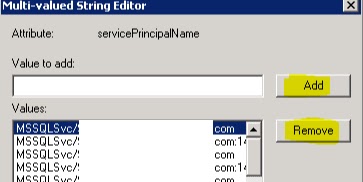
(5) Alternatively, these tasks can be performed through ADSIEDIT. Connect to default naming context, navigate through the service account, select attribute servicePrincipalName and click Edit. Be very careful as ADSIEDIT is low level editor and could impact the environment if not handled properly.


(6) Now we can add or remove the SPN associated with the service account.


Monday, February 8, 2016

How To Dual Boot Using Virtual Hard Disk (VHD)

PART  I: Converting an ISO image to VHD file

Introduction:

Very often we require to have a dual boot system, maybe for some study purpose or for some training purpose. For a physical machine in which Secure Boot (UEFI) is enabled, is very difficult to make it a dual boot system. Using a Virtual Hard Disk (VHD) it is easy to make a dual boot system in UEFI (replaces BIOS). Nowadays OEM pre-installed OS comes with these security features.

A brief introduction to UEFI (Unified Extensible Firmware Interface)


  • UEFI allows firmware to implement a security policy

  • Secure boot is a UEFI protocol not a feature of OS

  • UEFI secure boot is part of Windows 8 secured boot architecture

  • Windows 8 utilizes secure boot to ensure that the pre-OS environment is secure

  • Secure boot doesn’t “lockout” operating system loaders but is a policy that allows firmware to validate the authenticity of components

  • OEMs have the ability to customize their firmware to meet the needs of their customers by customizing the level of certificate and policy management on their platform

  • Microsoft does not mandate or control the settings on PC firmware that control or enable secured boot from any operating system other than Windows.


  • Why convert an ISO to VHD?

    Using an ISO image virtual machines can be made bootable but not the physical machines. VHD files can be used for booting a physical machine. For this reason, we need to have an OS in VHD format, either we can directly download the OS in VHD format or we can convert an OS in ISO format to VHD format.

    How to convert an ISO to VHD?

    (1) Download windows image converter script (Convert-WindowsImage.ps1) from the following link

    (2) Put the file in the root directory, preferably C:\
    (3) Right-click on the file, click on properties, and then unblock it.


    (4) Login as Administrator or run the PowerShell in admin mode.
    (5) Change the execution policy to 'RemoteSigned'.


    (6) Now run the following command to show GUI mode

    (7) Now GUI will open:


    (8) Select source file (ISO file), OS Edition (SKU), VHD type, size, working directory, and then click on 'Make my VHD'.


    (9) Wait for few minutes until you get confirmation


    (10) Your VHD is ready now. You can find it in the root directory/ working directory. In this case at C:\


    Note: This script is tested with Windows 8, Windows 8.1, Windows Server 2012, and Windows Server 2012 R2.


    PART - II: Mounting VHD file and making it dual boot

    (1) Open disk management console (Run->diskmgmt.msc) click on Action and select Attach VHD


    (2) Browse for VHD file (in this case C:\)


    (3) Now the VHD will be mounted on a drive (In this case K:\)


    (4) Run command prompt as Administrator and create boot file for K:\Windows


    (5) To edit the boot options download EasyBCD2.2 and edit the boot option


    (6) Restart the system and you are done :)


    Thursday, November 5, 2015

    Restore Deleted Objects From AD Using Recycle Bin Feature

    Enable Recycle Bin Feature:

    Recycle bin feature available in Windows Server 2008 R2 and later versions. Make sure this feature is enabled before restoring any deleted object in AD.

    To Check open Powershell window and type below commands:

    PS C:\Import-Module ActiveDirectory

    PS C:\Get-ADOptionalFeature -filter


    EnabledScopes blank {} shows that the Recycle bin feature is not enabled.

    To enable the feature, run the below command:

    PS C:\Enable-OptionalFeature 'Recycle Bin Feature' -Scope ForestOrConfigurationSet  -Target domain.com


    Restore deleted objects:

    To restore the deleted object we must know the GUID of the deleted object. To get the GUID of the deleted object run the below command:

    PS C:\Get-ADObject -filter 'isdeleted -eq $true -and name -ne "Deleted Objects" ' -includeDeltedObjects -property * >c.txt 


    Now find out the ObjectGUID from the text file and copy it. 


    Run below commands with the GUID to restore the object(s).

    PS C:\Restore-ADObect 4454bffb-118f-4f12-972e-60f722ee6462


    The deleted object will be restored with all the permissions and group membership.


    Saturday, March 1, 2014

    What's the Difference Between GPT and MBR When Partitioning

    Master Boot Record Vs. GUID Partition table

    Introduction:

    We make several partitions of our hard disk to keep various types of data or to make an isolation between system data and user data. The question is, how does the OS know the partition structure of the hard disk? That information has to come from somewhere. This is where MBR (Master Boot Record) and GPT (GUID Partition Table) come into play. While both are architecturally different, both play the same role in governing and provide information for the partitions in the hard disk.

    Master Boot Record (MBR)

    MBR is the old standard for managing the partition in the hard disk, and it is still being used extensively. The MBR resides at the very beginning of the hard disk and it holds the information on how the logical partitions are organized in the storage device. In addition, the MBR also contains executable code that can scan the partitions for the active OS and load up the boot-up code/procedure for the OS.

    A master boot record (MBR) is a special type of boot sector at the beginning of partitioned computer mass storage devices like fixed disks or removable drives. The concept of MBRs was publicly introduced in 1983 with PC DOS 2.0.

    The MBR holds the information on how the logical partitions, containing file systems, are organized on that medium. Besides that, the MBR also contains executable code to function as a loader for the installed operating system—usually by passing control over to the loader's second stage, or in conjunction with each partition's volume boot record (VBR). This MBR code is usually referred to as a boot loader.

    The organization of the partition table in the MBR limits the maximum addressable storage space of a disk to 2 TB per partition with a total no of four partitions.
    This is how a typical MBR disk layout looks like:

    There are several pitfalls with MBR. First of all, you can only have 4 partitions in the hard disk and each partition is limited to the only 2TB in size. This is not going to work well with the hard disk of big storage space, say 100TB. Secondly, the MBR is the only place that holds the partition information. If it ever gets corrupted (and yes, it can get corrupted very easily), the entire hard disk is unreadable.

    GUID Partition Table (GPT)

    GPT is a standard for the layout of the partition table on a physical hard disk, using globally unique identifiers (GUID). Although it forms a part of the Unified Extensible Firmware Interface (UEFI) standard (Unified EFI Forum proposed replacement for the PC BIOS), it is also used on some BIOS systems because of the limitations of master boot record (MBR) partition tables, which use 32 bits for storing logical block addresses (LBA) and size information.

    With GPT, you can create theoretically unlimited partitions on the hard disk, even though it is generally restricted to 128 partitions. Unlike MBR that limits each partition to only 2TB in size, each partition in GPT can hold up to 9.44ZB for a 512-byte block (1 ZB is 1 billion terabytes). In Microsoft Windows, that size is limited to 256 TB.
    This is how a GPT disk layout looks like:
    From the GPT Table Scheme diagram above, you can see that there is a primary GPT at the beginning of the hard disk and a secondary GPT at the end. This is what makes GPT more useful than MBR. GPT stores a backup header and partition table at the end of the disk so it can be recovered if the primary tables are corrupted. It also carries out CRC32 checksums to detect errors and corruption of the header and partition table.

    You can also see that there is a protective MBR in the first sector of the hard disk. Such a hybrid setup is to allow a BIOS-based system to boot from a GPT disk using a boot loader stored in the protective MBR’s code area. In addition, it protects the GPT disk from damage by GPT-unaware disk utilities.

    Conclusion

    In most cases, you will be fine with either MBR or GPT. It is only in a situation where you need four primary partitions or when you need to have a partition bigger than 2TB, that you need to use GPT, or convert MBR to GPT. Also, for the newer model of computer that uses UEFI, it will only support GPT.
    
    (References: Wikipedia)

    Wednesday, December 4, 2013

    Cloud Computing- An Overview


    The term 'Cloud Computing' is quite common nowadays, yet very confusing and seems to be a huge technical monster. But in reality, this cloud is the same as the Internet cloud. Typically, the Internet is represented in network diagrams as a CLOUD. A brief introduction to Could Computing is given below:


    Monday, December 2, 2013

    Tuesday, December 11, 2012

    Windows Command Line Utility

    Manage your Windows OS with three command-line utilities:

    .CPL
    .MSC
    .EXE


    (1) Control Panel (.cpl) Applet commands:

    These commands can be executed directly from Start ->Run (without prefix 'control'):


    Control Panel Applet
    Command
    OS
    Accessibility Options
    control access.cpl
    XP
    Action Center
    control /name Microsoft.ActionCenter
    8, 7
    control wscui.cpl
    8, 7
    Add Features to Windows 8
    control /name Microsoft.WindowsAnytimeUpgrade
    8
    Add Hardware
    control /name Microsoft.AddHardware
    Vista
    control hdwwiz.cpl
    XP
    Add or Remove Programs
    control appwiz.cpl
    XP
    Administrative Tools
    control /name Microsoft.AdministrativeTools
    8, 7, Vista
    control admintools
    8, 7, Vista, XP
    Automatic Updates
    control wuaucpl.cpl
    XP
    BitLocker Drive Encryption
    control /name Microsoft.BitLockerDriveEncryption
    8, 7, Vista
    Bluetooth Devices
    control bthprops.cpl
    8, 7, Vista
    control /name Microsoft.BluetoothDevices
    Vista
    Color Management
    control /name Microsoft.ColorManagement
    8, 7, Vista
    Credential Manager
    control /name Microsoft.CredentialManager
    8, 7
    Client Service for NetWare
    control nwc.cpl
    XP
    Date and Time
    control /name Microsoft.DateAndTime
    8, 7, Vista
    control timedate.cpl
    8, 7, Vista
    control date/time
    8, 7, Vista, XP
    Device Manager
    control /name Microsoft.DeviceManager
    8, 7, Vista
    control hdwwiz.cpl
    8, 7, Vista
    Devices and Printers
    control /name Microsoft.DevicesAndPrinters
    8, 7
    control printers
    8, 7
    Display
    control /name Microsoft.Display
    8, 7
    control desk.cpl
    XP
    control desktop
    XP
    Ease of Access Center
    control /name Microsoft.EaseOfAccessCenter
    8, 7, Vista
    control access.cpl
    8, 7, Vista
    Family Safety
    control /name Microsoft.ParentalControls
    8
    File History
    control /name Microsoft.FileHistory
    8
    Flash Player Settings Manager
    control flashplayercplapp.cpl
    8
    Folder Options
    control /name Microsoft.FolderOptions
    8, 7, Vista
    control folders
    8, 7, Vista, XP
    Fonts
    control /name Microsoft.Fonts
    8, 7, Vista
    control fonts
    8, 7, Vista, XP
    Game Controllers
    control /name Microsoft.GameControllers
    8, 7, Vista
    control joy.cpl
    8, 7, Vista, XP
    Keyboard
    control /name Microsoft.Keyboard
    8, 7, Vista
    control keyboard
    8, 7, Vista, XP
    Language
    control /name Microsoft.Language
    8
    Mail
    control mlcfg32.cpl
    8, 7, Vista, XP
    Mouse
    control /name Microsoft.Mouse
    8, 7, Vista
    control main.cpl
    8, 7, Vista
    control mouse
    8, 7, Vista, XP
    Network and Sharing Center
    control /name Microsoft.NetworkAndSharingCenter
    8, 7, Vista
    Network Connections
    control ncpa.cpl
    8, 7, Vista
    control netconnections
    8, 7, Vista, XP
    Network Setup Wizard
    control netsetup.cpl
    8, 7, Vista, XP
    ODBC Data Source Administrator
    control odbccp32.cpl
    XP6
    Parental Controls
    control /name Microsoft.ParentalControls
    7, Vista
    Pen and Input Devices
    control /name Microsoft.PenAndInputDevices
    Vista
    control tabletpc.cpl
    Vista
    Pen and Touch
    control /name Microsoft.PenAndTouch
    8, 7
    control tabletpc.cpl
    8, 7
    People Near Me
    control /name Microsoft.PeopleNearMe
    7, Vista
    control collab.cpl
    7, Vista
    Personalization
    control /name Microsoft.Personalization
    8, 7, Vista
    control desktop
    8, 7, Vista
    Phone and Modem Options
    control /name Microsoft.PhoneAndModemOptions
    Vista
    control telephon.cpl
    Vista, XP
    Phone and Modem
    control /name Microsoft.PhoneAndModem
    8, 7
    control telephon.cpl
    8, 7
    Power Options
    control /name Microsoft.PowerOptions
    8, 7, Vista
    control powercfg.cpl
    8, 7, Vista, XP
    Printers and Faxes
    control printers
    XP
    Printers
    control /name Microsoft.Printers
    Vista
    control printers
    Vista
    Problem Reports and Solutions
    control /name Microsoft.ProblemReportsAndSolutions
    Vista
    Programs and Features
    control /name Microsoft.ProgramsAndFeatures
    8, 7, Vista
    control appwiz.cpl
    8, 7, Vista
    Recovery
    control /name Microsoft.Recovery
    8, 7
    Region
    control /name Microsoft.RegionAndLanguage
    8
    control intl.cpl
    8
    control international
    8
    Region and Language
    control /name Microsoft.RegionAndLanguage
    7
    control intl.cpl
    7
    control international
    7
    Regional and Language Options
    control /name Microsoft.RegionalAndLanguageOptions
    Vista
    control intl.cpl
    Vista
    control international
    Vista, XP
    RemoteApp and Desktop Connections
    control /name Microsoft.RemoteAppAndDesktopConnections
    8, 7
    Scanners and Cameras
    control /name Microsoft.ScannersAndCameras
    8, 7, Vista
    control sticpl.cpl
    XP
    Scheduled Tasks
    control schedtasks
    XP7
    Screen Resolution
    control desk.cpl
    8, 7
    Security Center
    control /name Microsoft.SecurityCenter
    Vista
    control wscui.cpl
    XP
    Sound
    control /name Microsoft.Sound
    8, 7
    control /name Microsoft.AudioDevicesAndSoundThemes
    Vista
    control mmsys.cpl
    8, 7, Vista
    Sounds and Audio Devices
    control mmsys.cpl
    XP
    Speech Recognition Options
    control /name Microsoft.SpeechRecognitionOptions
    Vista
    Speech Recognition
    control /name Microsoft.SpeechRecognition
    8, 7
    Speech
    control sapi.cpl
    XP
    Storage Spaces
    control /name Microsoft.StorageSpaces
    8
    Sync Center
    control /name Microsoft.SyncCenter
    8, 7, Vista
    System
    control /name Microsoft.System
    8, 7, Vista
    control sysdm.cpl
    XP
    System Properties
    control sysdm.cpl
    8, 7, Vista
    Tablet PC Settings
    control /name Microsoft.TabletPCSettings
    8, 7, Vista
    Task Scheduler
    control schedtask
    8, 7, Vista
    Taskbar
    control /name Microsoft.Taskbar
    8
    rundll32.exe shell32.dll,Options_RunDLL 1
    8
    Taskbar and Start Menu
    control /name Microsoft.TaskbarAndStartMenu
    7, Vista
    rundll32.exe shell32.dll,Options_RunDLL 1
    7, Vista, XP
    Text to Speech
    control /name Microsoft.TextToSpeech
    8, 7, Vista
    Troubleshooting
    control /name Microsoft.Troubleshooting
    8, 7
    User Accounts
    control /name Microsoft.UserAccounts
    8, 7, Vista
    control userpasswords
    8, 7, Vista, XP
    Welcome Center
    control /name Microsoft.WelcomeCenter
    Vista
    Windows 7 File Recovery
    control /name Microsoft.BackupAndRestore
    8
    Windows Anytime Upgrade
    control /name Microsoft.WindowsAnytimeUpgrade
    7, Vista
    Windows CardSpace
    control /name Microsoft.CardSpace
    7, Vista
    control infocardcpl.cpl
    7, Vista
    Windows Defender
    control /name Microsoft.WindowsDefender
    8, 7, Vista
    Windows Firewall
    control /name Microsoft.WindowsFirewall
    8, 7, Vista
    control firewall.cpl
    8, 7, Vista, XP
    Windows Marketplace
    control /name Microsoft.GetProgramsOnline
    Vista
    Windows Mobility Center
    control /name Microsoft.MobilityCenter
    8, 7, Vista
    Windows Sidebar Properties
    control /name Microsoft.WindowsSidebarProperties
    Vista
    Windows SideShow
    control /name Microsoft.WindowsSideShow
    8,7, Vista
    Windows Update
    control /name Microsoft.WindowsUpdate
    8, 7, Vista
    Wireless Link
    control irprops.cpl
    XP


     (2) Microsoft Saved Console (.msc) commands: 

    Here is the list of msc commands that are applicable for Windows Servers. (Few commands may also run on Windows client OS)


    Applet
    Command
     AD Domains and Trusts
     domain.msc
     Active Directory Management
     admgmt.msc
     AD Sites and Services
     dssite.msc
     AD Users and Computers
     dsa.msc
     ADSI Edit
     adsiedit.msc
     Authorization manager
     azman.msc
     Certification Authority Management
     certsrv.msc
     Certificate Templates
     certtmpl.msc
     Cluster Administrator
     cluadmin.exe
     Computer Management
     compmgmt.msc
     Component Services
     comexp.msc
     Configure Your Server
     cys.exe
     Device Manager
     devmgmt.msc
     DHCP Management
     dhcpmgmt.msc
     Disk Defragmenter
     dfrg.msc
     Disk Manager
     diskmgmt.msc
     Distributed File System
     dfsgui.msc
     DNS Management
     dnsmgmt.msc
     Event Viewer
     eventvwr.msc
     Indexing Service Management
     ciadv.msc
     IP Address Manage
     ipaddrmgmt.msc
     Licensing Manager
     llsmgr.exe
     Local Certificates Management
     certmgr.msc
     Local Group Policy Editor
     gpedit.msc
     Local Security Settings Manager
     secpol.msc
     Local Users and Groups Manager
     lusrmgr.msc
     Network Load balancing
     nlbmgr.exe
     Performance Monitor
     perfmon.msc
     PKI Viewer
     pkiview.msc
     Public Key Management
     pkmgmt.msc
     Quality of Service Control Management
     acssnap.msc
     Remote Desktop
     tsmmc.msc
     Remote Storage Administration
     rsadmin.msc
     Removable Storage
     ntmsmgr.msc
     Removable Storage Operator Requests
     ntmsoprq.msc
     Routing and Remote Access Manager
     rrasmgmt.msc
     Resultant Set of Policy
     rsop.msc
     Schema management
     schmmgmt.msc
     Services Management
     services.msc
     Shared Folders
     fsmgmt.msc
     SID Security Migration
     sidwalk.msc
     Telephony Management
     tapimgmt.msc
     Terminal Server Configuration
     tscc.msc
     Terminal Server Licensing
     licmgr.exe
     Terminal Server Manager
     tsadmin.exe
     Teminal Services RDP
     MSTSC
     Teminal Services RDP to Console
     mstsc /v:[server] /console
     UDDI Services Managment
     uddi.msc
     Windows Mangement Instumentation
     wmimgmt.msc
     WINS Server manager
     winsmgmt.msc


     (3) Run (.exe) commands: 

    Some of the commands may not run on Windows XP systems


    Program Name
    Run Command
    About Windows
    winver
    Add a Device
    devicepairingwizard
    Add Hardware Wizard
    hdwwiz
    Advanced User Accounts
    netplwiz
    Authorization Manager
    azman
    Backup and Restore
    sdclt
    Bluetooth File Transfer
    fsquirt
    Calculator
    calc
    Certificates
    certmgr
    Change Computer Performance Settings
    systempropertiesperformance
    Change Data Execution Prevention Settings
    systempropertiesdataexecutionprevention
    Change Printer Settings
    printui
    Character Map
    charmap
    ClearType Tuner
    cttune
    Color Management
    colorcpl
    Command Prompt
    cmd
    Component Services
    comexp
    Component Services
    dcomcnfg
    Computer Management
    compmgmt
    Computer Management
    compmgmtlauncher
    Connect to a Network Projector
    netproj
    Connect to a Projector
    displayswitch
    Control Panel
    control
    Create A Shared Folder Wizard
    shrpubw
    Create a System Repair Disc
    recdisc
    Credential Backup and Restore Wizard
    credwiz
    Data Execution Prevention
    systempropertiesdataexecutionprevention
    Default Location
    locationnotifications
    Device Manager
    devmgmt
    Device Pairing Wizard
    devicepairingwizard
    Diagnostics Troubleshooting Wizard
    msdt
    Digitizer Calibration Tool
    tabcal
    DirectX Diagnostic Tool
    dxdiag
    Disk Cleanup
    cleanmgr
    Disk Defragmenter
    dfrgui
    Disk Management
    diskmgmt
    Display
    dpiscaling
    Display Color Calibration
    dccw
    Display Switch
    displayswitch
    DPAPI Key Migration Wizard
    dpapimig
    Driver Verifier Manager
    verifier
    Ease of Access Center
    utilman
    EFS REKEY Wizard
    rekeywiz
    Encrypting File System Wizard
    rekeywiz
    Event Viewer
    eventvwr
    Fax Cover Page Editor
    fxscover
    File Signature Verification
    sigverif
    Font Viewer
    fontview
    Getting Started
    gettingstarted
    IExpress Wizard
    iexpress
    Import to Windows Contacts
    wabmig
    Install or Uninstall Display Languages
    lusrmgr
    Internet Explorer
    iexplore
    iSCSI Initiator Configuration Tool
    iscsicpl
    iSCSI Initiator Properties
    iscsicpl
    Language Pack Installer
    lpksetup
    Local Group Policy Editor
    gpedit
    Local Security Policy
    secpol
    Local Users and Groups
    lusrmgr
    Location Activity
    locationnotifications
    Magnifier
    magnify
    Malicious Software Removal Tool
    mrt
    Manage Your File Encryption Certificates
    rekeywiz
    Math Input Panel
    mip
    Microsoft Management Console
    mmc
    Microsoft Support Diagnostic Tool
    msdt
    NAP Client Configuration
    napclcfg
    Narrator
    narrator
    New Scan Wizard
    wiaacmgr
    Notepad
    notepad
    ODBC Data Source Administrator
    odbcad32
    ODBC Driver Configuration
    odbcconf
    On-Screen Keyboard
    osk
    Paint
    mspaint
    Performance Monitor
    perfmon
    Performance Options
    systempropertiesperformance
    Phone Dialer
    dialer
    Presentation Settings
    presentationsettings
    Print Management
    printmanagement
    Printer Migration
    printbrmui
    Printer User Interface
    printui
    Private Character Editor
    eudcedit
    Problem Steps Recorder
    psr
    Protected Content Migration
    dpapimig
    Registry Editor
    regedit
    regedt32
    Remote Access Phonebook
    rasphone
    Remote Desktop Connection
    mstsc
    Resource Monitor
    resmon
    perfmon /res
    Resultant Set of Policy
    rsop
    Securing the Windows Account Database
    syskey
    Services
    services
    Set Program Access and Computer Defaults
    computerdefaults
    Share Creation Wizard
    shrpubw
    Shared Folders
    fsmgmt
    Snipping Tool
    snippingtool
    Sound Recorder
    soundrecorder
    SQL Server Client Network Utility
    cliconfg
    Sticky Notes
    stikynot
    Stored User Names and Passwords
    credwiz
    Sync Center
    mobsync
    System Configuration
    msconfig
    System Configuration Editor
    sysedit
    System Information
    msinfo32
    System Properties (Advanced Tab)
    systempropertiesadvanced
    System Properties (Computer Name Tab)
    systempropertiescomputername
    System Properties (Hardware Tab)
    systempropertieshardware
    System Properties (Remote Tab)
    systempropertiesremote
    System Properties (System Protection Tab)
    systempropertiesprotection
    System Restore
    rstrui
    Tablet PC Input Panel
    tabtip
    Task Manager
    taskmgr
    Task Scheduler
    taskschd
    Trusted Platform Module (TPM) Management
    tpm
    User Account Control Settings
    useraccountcontrolsettings
    Utility Manager
    utilman
    Version Reporter Applet
    winver
    Volume Mixer
    sndvol
    Windows Activation Client
    slui
    Windows Anytime Upgrade Results
    windowsanytimeupgraderesults
    Windows Contacts
    wab
    Windows Disc Image Burning Tool
    isoburn
    Windows DVD Maker
    dvdmaker
    Windows Easy Transfer
    migwiz
    Windows Explorer
    explorer
    Windows Fax and Scan
    wfs
    Windows Features
    optionalfeatures
    Windows Firewall with Advanced Security
    wf
    Windows Help and Support
    winhlp32
    Windows Journal
    journal
    Windows Media Player
    dvdplay
    wmplayer
    Windows Memory Diagnostic Scheduler
    mdsched
    Windows Mobility Center
    mblctr
    Windows Picture Acquisition Wizard
    wiaacmgr
    Windows PowerShell
    powershell
    Windows PowerShell ISE
    powershell_ise
    Windows Remote Assistance
    msra
    Windows Repair Disc
    recdisc
    Windows Script Host
    wscript
    Windows Update
    wuapp
    Windows Update Standalone Installer
    wusa
    WMI Management
    wmimgmt
    WMI Tester
    wbemtest
    WordPad
    write
    XPS Viewer
    xpsrchvw